


My physical SIM scan isn't working
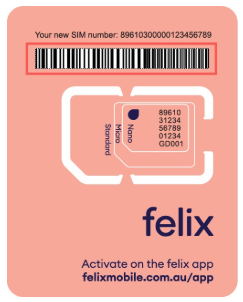
No problem! We recommend entering the SIM number manually, which is a 20-digit SIM number starting with 8961 that can be found on the SIM itself. From the Scan your felix SIM in the app, tap Enter manually > add your SIM number.
We’ve pre-filled the first section of the SIM number for you, so you’ll just need to add the remaining numbers.
Related Articles
Need more help?
Chat with us
Our Australian based support team is online until 8PM today (Sydney time). Support times

Need help?
Chat with us
Our Australian based support team is online until 8PM today (Sydney time). Support times
